








Unified endpoint management platform

All your endpoint management. One unified platform.

CapaOne is a unified endpoint management platform for IT teams that replaces 4–5 point solutions. Its six products share one console: they patch and deploy applications, install Windows, remove standing admin rights, manage phones and tablets, and show errors and vulnerabilities on Windows PCs. CapaSystems builds it in Denmark and runs it in the EU, and it works with Microsoft Intune or entirely without it.

From EUR 1 per endpoint per month · Free trial, no credit card required

  • NIRAS
  • Lattec
  • Holbæk Municipality
  • Vordingborg Køkkenet
  • Ishøj Municipality
  • Folketidende Gruppen
  • ISC
  • Dignity
  • Toms
Six products, one platform

The Whole Endpoint Lifecycle in One Platform

From the first boot to the daily patch, CapaOne does the work your IT team does on every endpoint. Start with the products you need and turn on the rest when you are ready.

Deploy

New PCs and Phones, Ready for Work

  • Install Windows on a new or wiped PC in about 15 minutes, with no deployment server.
  • Drivers kept up to date for Dell, HP, Lenovo, Microsoft, Dynabook, ASUS and Acer.
  • Phones and tablets enroll without anyone touching them, through Apple Business Manager, Android zero-touch or Samsung Knox.

15 min from bare metal to ready device
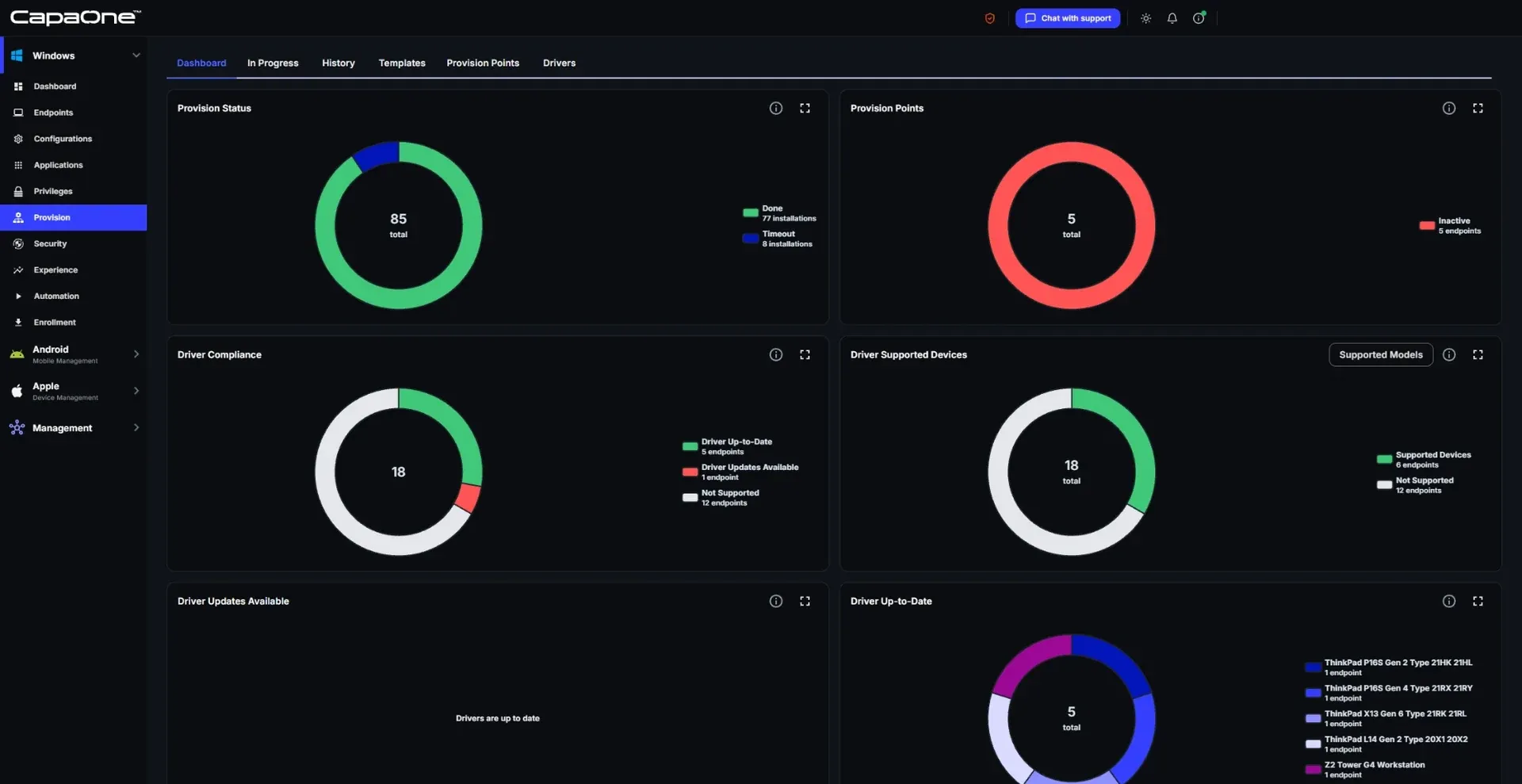
Provision Manager: provisioning status, provisioning points and driver compliance
Keep up to date

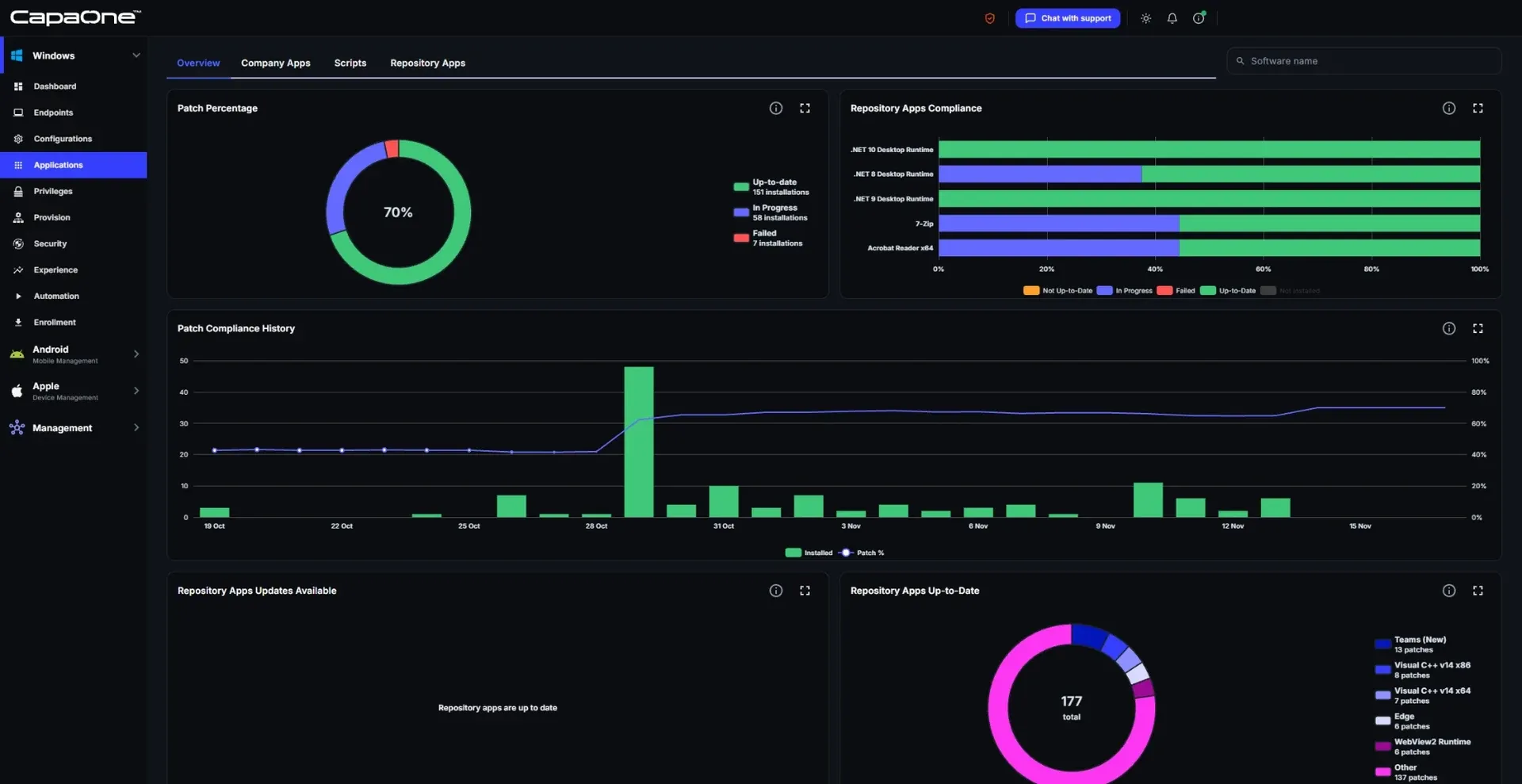
Every Application Patched and Deployed

  • More than 30,000 applications monitored, with packages built automatically for the ones your endpoints run.
  • Your own business applications packaged without scripting, tested before they reach production.
  • Windows updates handled in the same platform.

30,000+ applications monitored

Application Manager: patch percentage, repository app compliance and patch history
Secure

See What Is Exposed, and Close It

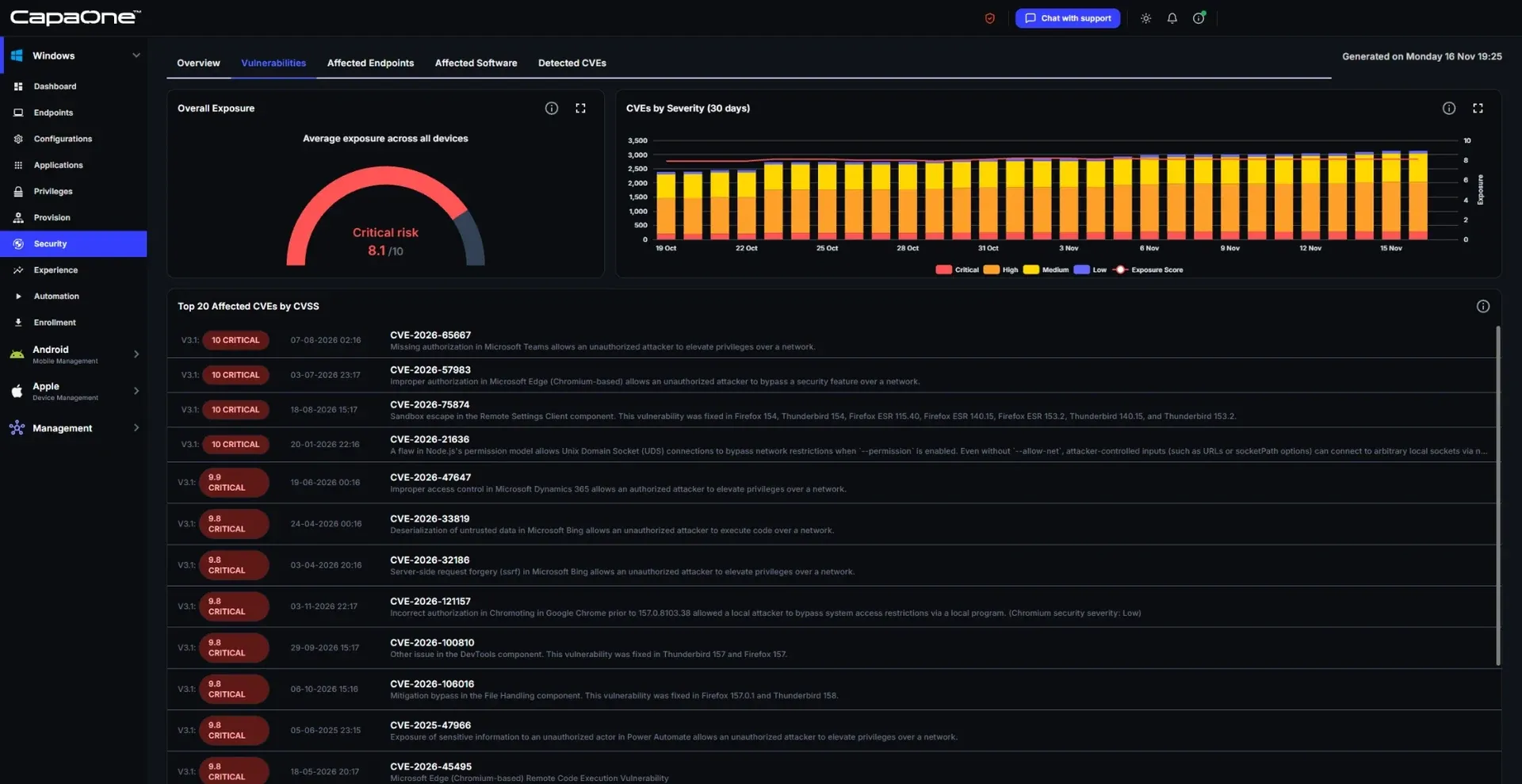
  • Vulnerabilities checked against the NIST CVE database every day and ranked by risk.
  • Antivirus, encryption, firewall, Windows Update and more in one security score.
  • No standing local admin rights: a user asks for one application to be elevated, and every elevation is logged.

0 standing local admins

Security Monitor: overall exposure, CVEs by severity over 30 days and the most critical CVEs ranked by CVSS
Understand

Know Which PCs Are Struggling, and Why

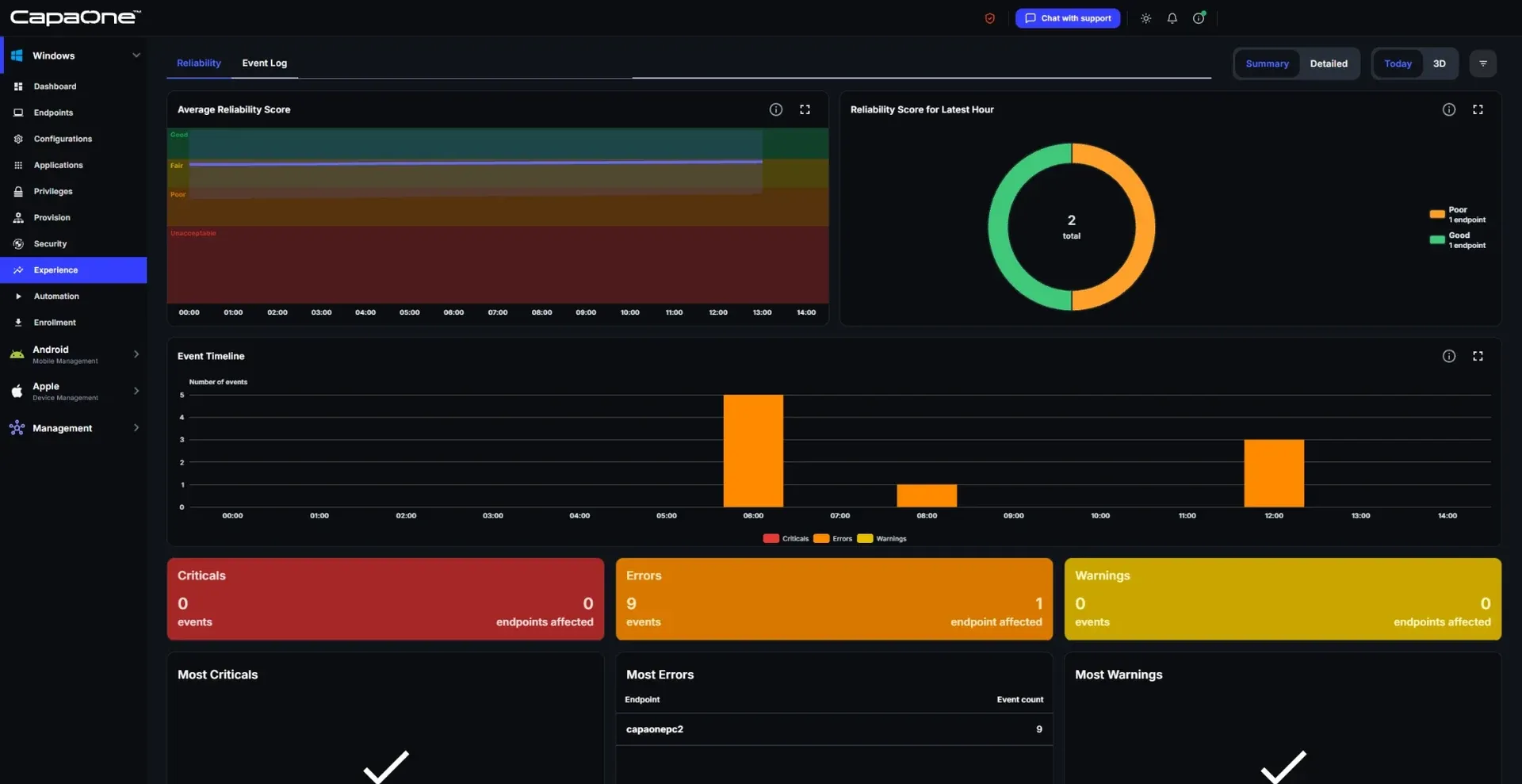
  • A reliability score from 1 to 10 for every Windows endpoint.
  • The System and Application event logs of every PC, searchable in one place.
  • Three months of history, so you see when a problem started.

3 months of reliability history

Experience Monitor: average reliability score, event timeline and critical, error and warning events
Better together

Find It in One Product, Fix It in the Next

One product finds the problem and another one fixes it, in the same console. Fewer hand-offs between tools, and less manual work.

A Vulnerability, Then the Update

Security Monitor maps a CVE to the endpoints that have it. You start the update from Security Monitor, and Application Manager rolls it out.

Standing Admins, Then No Need for Them

Security Monitor shows which endpoints have local administrators. Privilege Manager gives users admin rights on demand, so you can remove the standing ones.

An Error After an Update

Experience Monitor shows the same error in the event log of several PCs. Application Manager rolls out the fix to those PCs.

A New or Broken PC

Provision Manager installs Windows and the right drivers from bare metal in about 15 minutes. Application Manager then installs the applications.

From our customers
“We manage 3,000 devices across 60 offices from one platform — without an army of admins.”
NIRAS, Global engineering consultancyRead the NIRAS story
Architecture

How the Platform Is Built

Fewer moving parts means less to maintain: one agent, one cloud service and one console — a fit that matters most for mid-market organizations running lean IT teams.

One agent, nothing new to roll out

One lightweight agent on each Windows PC and server serves all five Windows products. Adding a product means no new agent and nothing to re-install.

Phones and tablets in the same place

Mobile Manager enrolls iPhone, iPad and Android devices through Apple Business Manager and Android Enterprise, in the same console as your PCs.

One place to see what needs attention

Every product reads the same inventory and the same groups at dash.capaone.com. Your team signs in with Microsoft Entra ID, under your own sign-in and MFA policies.

No servers to run, live in under 30 minutes

CapaSystems runs the service in data centers in Europe, and you install nothing on premises except the agent. CapaOne is live in under 30 minutes and fully operational within days.

See it in action

See the platform in action

A tour of the console — no signup, no install.

0:00 / 1:52

In this demo

  • One platform for visibility, control and action. One cloud-native platform. Every endpoint, one dashboard.
  • Manage every app from one governed catalog. Apps, versions and release status — one governed catalog.
  • Remove local admin rights — without slowing users down. Remove admin rights while users keep working.
  • Provision, recover and standardize — faster. Standardize setup, drivers and bare-metal recovery.
  • Turn endpoint data into security action. Antivirus, encryption, firewall, patching — one security score.
  • See which PCs are struggling, and why. See the errors behind an unstable PC — then fix them with Application Manager.
  • Phones and tablets, in the same console. iOS, iPadOS and Android — managed alongside your desktops.
  • Standalone. Or perfect with Intune. A complete platform — designed to work with Microsoft Intune, or entirely without it.
Standalone or alongside Intune

With Microsoft Intune, or Entirely Without It

CapaOne runs as a complete endpoint management platform on its own. If you run Microsoft Intune, CapaOne runs next to it, in its own console, with third-party patching, Windows deployment, privilege control and vulnerability insight.

CapaOne on its own

  • Application patching, Windows deployment, admin rights, mobile devices and vulnerabilities in one platform
  • No Microsoft Intune required
  • No on-prem infrastructure to stand up or maintain
Start a free trial →

CapaOne next to Intune

  • Intune keeps the tasks you already run there
  • CapaOne handles third-party patching, Windows deployment with drivers, admin rights on demand and vulnerability insight
  • Privilege Manager rules can target your Entra ID groups
How CapaOne works with Intune →

Integrations

  • Microsoft Entra IDYour team signs in to the console with Entra ID, and Privilege Manager rules can target your Entra ID groups.
  • Microsoft IntuneCapaOne runs next to Intune in its own console, or entirely without it.
  • Windows AutopilotProvision Manager works with Autopilot, and on its own.
  • Apple Business ManagerMobile Manager enrolls company-owned iPhone and iPad devices.
  • Android EnterpriseMobile Manager enrolls Android devices and delivers apps through Managed Google Play.
  • AI assistants (beta)Ask questions about your Windows endpoints in plain language through the CapaOne MCP Server.
AI endpoint management (beta) →
Built in Europe

Endpoint Data Stays in the EU

The platform handles patch status, vulnerabilities and admin rights. Where that data lives is a design decision, and CapaOne keeps it in the EU.

Danish-built since 1996

CapaSystems A/S in Taastrup, Denmark, builds CapaOne on 30+ years of endpoint management.

EU-hosted

EU-hosted, with no transfer of endpoint data to US jurisdiction.

GDPR-first, NIS2-aligned

A GDPR-first platform that supports a NIS2-aligned security posture.

1,500,000+ endpoints

Under management, from municipalities to global engineering consultancies.

“EU hosting and GDPR alignment made the buying decision easy for us.”
Holbæk Municipality
Read about European sovereignty →
Simple, per-endpoint pricing

EUR 1 per endpoint, per month, per product

The CapaOne Windows Bundle has all five Windows products for EUR 3 per endpoint per month. Mobile Manager costs EUR 1 per mobile endpoint, outside the Bundle. A minimum contract applies, and the estimator does the math.

The category

What Is Unified Endpoint Management?

Unified endpoint management (UEM) means managing every endpoint an organization runs, from Windows PCs and servers to phones and tablets, in one platform with one inventory. It replaces a separate tool for each task: one for patching, one for deployment, one for admin rights, one for phones.

Separate point tools

What it manages
One task each: patching, deployment, admin rights or vulnerabilities
Consoles
One per tool
Inventory
One per tool, often out of step
Agents on a Windows PC
Often one per tool

Mobile device management (MDM)

What it manages
Settings, apps and security on phones and tablets
Consoles
One, for mobile devices
Inventory
Phones and tablets
Agents on a Windows PC
Usually none: it uses the device’s built-in management

Unified endpoint management (UEM)

What it manages
PCs, servers, phones and tablets, across every task
Consoles
One
Inventory
One, shared by every task
Agents on a Windows PC
One shared agent

CapaOne is a unified endpoint management platform: Windows PCs and servers, iPhone, iPad and Android devices, in one console. It replaces 4–5 point solutions with one platform.

Questions, answered

Frequently Asked Questions

What Is Unified Endpoint Management (UEM)?

Unified endpoint management means managing every endpoint an organization runs, from Windows PCs and servers to phones and tablets, in one platform with one inventory, instead of a separate tool for each task.

Is CapaOne a Unified Endpoint Management Platform?

Yes. CapaOne manages Windows PCs and servers, iPhone, iPad and Android devices in one console. Its six products patch and deploy applications, install Windows, remove standing admin rights, manage phones and tablets, and show errors and vulnerabilities on Windows PCs.

How Many Agents Does CapaOne Need?

One. A single CapaOne agent on each Windows PC and server serves all five Windows products, and turning on another product adds no new agent. Phones and tablets connect through Apple and Android device management.

Do I Need Microsoft Intune to Use CapaOne?

No. CapaOne runs as a complete endpoint management platform on its own. If you run Intune, CapaOne runs next to it in its own console. See how CapaOne works with Intune.

Where Does CapaOne Store Endpoint Data?

CapaOne is EU-hosted, with no transfer of endpoint data to US jurisdiction. CapaSystems builds the platform in Denmark. More on European sovereignty.

Do I Need to Buy All Six Products?

No. Each product costs EUR 1 per endpoint per month, and the CapaOne Windows Bundle has all five Windows products for EUR 3. Start with what you need and add the rest later. The pricing page estimates your price.

How Fast Can We Get Started?

CapaOne is live in under 30 minutes and fully operational across your endpoints within days. There is no on-prem infrastructure to stand up.

See the Platform on Your Own Endpoints

A personal walkthrough, with Microsoft Intune or entirely without it.