 CapaOne
MDT was retired without warning, without a migration guide, and without an official replacement. Here’s what IT teams are actually choosing in 2026 — and what’s worth considering before you decide.
In late 2025, Microsoft quietly retired Microsoft Deployment Toolkit (MDT). No major announcement. No migration guide. No official replacement. For thousands of IT teams that relied on MDT as the backbone of their Windows deployment workflow, the message was clear: figure it out yourself.
The reason MDT was retired matters. Security researchers identified vulnerabilities that allowed extraction of privileged Active Directory credentials directly from MDT deployment shares. Rather than patch the underlying architecture, Microsoft chose to end the product entirely. This means organizations still running MDT are not just using unsupported software — they are running infrastructure with known, unpatched security vulnerabilities.
At the same time, many IT teams are moving toward Microsoft Intune and Windows Autopilot. But this is where a critical misconception takes hold: Intune and Autopilot do not replace what MDT actually did. They manage devices. They do not deploy them from scratch.
⚠️ The core problem
MDT is gone. Intune cannot replace it. And every day you run legacy deployment infrastructure, you are running a known security risk.
This article explains what MDT actually did, why no single Microsoft-native tool replaces it today, and what modern IT teams are doing instead
What MDT Actually Did — and Why It's Hard to Replace
MDT was the tool IT teams reached for when a device had no operating system. Not for configuration. Not for policy enforcement. For getting Windows onto a machine that had nothing on it — whether that was a brand-new device out of the box, a system corrupted by malware, or refurbished hardware being standardized before handover.
In practice, MDT covered four scenarios that still occur every day in enterprise IT:
- New devices arriving with no OS pre-configured for the organization
- Failed or corrupted systems requiring a full rebuild
- Malware recovery requiring a complete wipe and reinstall
- Refurbished hardware being repurposed across departments
To handle these, MDT combined PXE boot, OS images, driver injection, task sequences, and post-deployment scripting into a single workflow. It was complex to maintain — but it worked, and there was nothing comparable built into the Microsoft stack that covered the same ground.
That is what makes replacing MDT genuinely difficult. The challenge is not finding a tool that mimics MDT’s interface. It is finding something that closes the same deployment gap without introducing the same infrastructure overhead that made MDT a liability in the first place.
Why MDT Was Built for a Different Era of IT
MDT was designed for an on-premise world where all devices lived inside a corporate network, deployment servers were maintained by in-house teams, and OS images were updated quarterly by hand. That model worked when the workforce was static and infrastructure was local.
Modern IT environments look nothing like that. Devices are distributed. Teams are remote. IT staff are expected to provision a device for an employee in another country without ever touching the hardware. MDT’s architecture — built around imaging servers, PXE infrastructure, and deployment shares — does not scale to that reality. It requires physical proximity, server maintenance, and manual image upkeep that consumes hours of IT time per cycle.
Microsoft’s retirement of MDT was not just a security decision. It was an acknowledgment that the underlying model had reached its end of life.
Why OS Deployment Still Matters Even Without MDT
A common assumption after MDT’s retirement is that modern cloud tools have simply made OS deployment unnecessary. That assumption is wrong, and it creates a dangerous gap in IT operations.
Consider the scenarios that still occur regardless of how mature your Intune environment is:
- A remote employee’s laptop fails completely. Without bare-metal deployment capability, the device has to be shipped back to IT — adding days of downtime and logistics cost.
- A device is hit by ransomware. The entire OS needs to be wiped and rebuilt from a clean state, not just reconfigured from Intune.
- New hardware arrives pre-loaded with a consumer Windows image that needs to be replaced with a corporate baseline before enrollment.
- A device in a secure facility needs to be rebuilt without being connected to the internet during deployment.
These are not edge cases. They are routine events in any organization managing more than a few hundred endpoints. The absence of a capable deployment tool does not make these scenarios go away — it just makes them more expensive and time-consuming to handle.
Why Intune and Autopilot Cannot Replace MDT
This is the most important misconception to address clearly: Microsoft Intune is a device management platform. Windows Autopilot is a device configuration service. Neither is a deployment tool.
Windows Autopilot requires a device that is already running a supported version of Windows. It handles out-of-box experience customization, Azure AD join, and initial policy application. It does not put Windows on a machine that has no OS. It does not recover a device that cannot boot. It does not reimage a system compromised by malware.
Intune fills the management layer above the OS — application deployment, configuration policies, compliance enforcement, patch management. It is excellent at what it does. But it has the same dependency: the device needs to be running Windows before Intune can do anything.
💡 The gap in plain terms
Autopilot configures a device. Intune manages a device. Neither can create a device from scratch. That is the gap MDT filled — and the gap that still needs to be filled today.
MDT Alternatives: What Are the Real Options?
Organizations evaluating MDT replacements typically land on one of four categories. Here is how they compare on the dimensions that matter most:
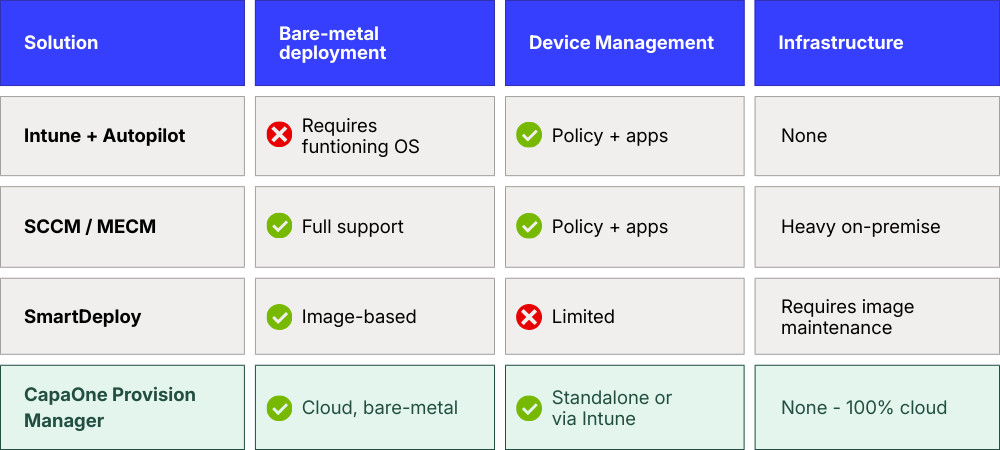
Each option involves a trade-off. The question is not which tool is technically capable — it is which model fits where IT operations are going.
Intune + Autopilot
The Microsoft-native path works well for new devices that arrive with Windows pre-installed. It is simple, cloud-based, and integrates cleanly with the rest of the Microsoft stack. But it does not address bare-metal scenarios, and treating it as a full MDT replacement leaves a visible gap the first time a device needs to be rebuilt from zero.
Configuration Manager (SCCM / MECM)
SCCM remains the most capable option for organizations that need full deployment control — including OS imaging, PXE boot, and task sequences. But it requires significant on-premise infrastructure, dedicated expertise to maintain, and ongoing investment in image management. For teams moving toward cloud-first operations, it moves in the wrong direction.
Imaging-based tools (e.g. SmartDeploy)
Tools like SmartDeploy simplify the MDT workflow and reduce some of the overhead around image creation. They are a reasonable transitional option for organizations not ready to move to a fully cloud-native model. The underlying approach — maintaining OS images and deploying them via traditional mechanisms — still requires manual upkeep and does not scale easily across distributed environments.
Cloud-based provisioning platforms
The emerging category. These platforms deploy Windows from bare metal over the internet, with no on-premise infrastructure, no image maintenance, and automated driver handling. The first deployment can be configured in under an hour. Devices in any location can be provisioned or recovered without being shipped back to IT. This is where enterprise endpoint deployment is heading.
The Real Shift: From Imaging to Cloud-Native Deployment
The deeper change MDT’s retirement signals is not about finding a tool that does what MDT did. It is about recognizing that the entire imaging model — build an image, maintain it, deploy it — is being replaced.
Maintaining OS images is expensive. Every application update, every Windows patch, every driver change potentially requires a new image to be built, tested, and distributed. In a fleet of thousands of devices with varied hardware, this becomes a full-time operational burden. The teams that do it well are not adding strategic value — they are managing technical debt.
The modern alternative eliminates the image entirely. Instead of deploying a pre-built image, the platform pulls a clean Microsoft OS, applies the correct drivers for the specific hardware automatically, and hands the device off to Intune for configuration. No image to maintain. No infrastructure to run. No manual packaging.
For IT teams, this shift has a concrete impact: the hours previously spent on image creation and driver packaging become available for work that actually moves the organization forward.
Provision Manager - Built for the Post-MDT World
CapaOne Provision Manager, part of the CapaOne Endpoint Management Platform, is designed specifically to fill the gap MDT leaves behind — without reintroducing the infrastructure complexity that made MDT a liability.
It is a 100% cloud-native solution. There are no servers to maintain, no deployment shares to secure, and no images to build. A device can be provisioned from bare metal to a fully managed endpoint using nothing but an internet connection. The first deployment template can be configured in under an hour.
For IT teams managing distributed workforces, the most immediately valuable capability is remote recovery. When a device fails — anywhere in the world — it can be reimaged from the cloud without being shipped back to IT. The device boots, connects to the platform, receives a clean OS with the correct drivers already installed, and hands off to Intune automatically. Downtime is measured in hours, not days.
Key capabilities include:
- Cloud-based bare-metal OS deployment — provision any device from scratch using nothing but an internet connection, with no local server or physical media required
- Automatic driver installation using manufacturer-certified packs for Dell, HP, Lenovo, and Microsoft hardware — eliminating manual driver packaging and reducing post-deployment incidents
- Remote recovery — reimage any failed device without shipping it back to IT
- Universal imaging — a single hardware-independent OS image works across all device models, reducing image maintenance overhead to zero
- Full Autopilot integration — provides the bare-metal foundation Autopilot requires for new or broken devices
- Zero infrastructure — replaces legacy deployment servers entirely, freeing IT from server maintenance and reducing operational costs
Provision Manager launches in April 2026. Early access is available now — IT teams can book a demo and see the platform before launch.
See how CapaOne Provision Manager replaces MDT — without the infrastructure.
Preparing for a Post-MDT Environment
For IT teams still running MDT, the priority is not just finding a replacement. It is understanding the security exposure that comes with continuing to run it. The known credential extraction vulnerabilities are not going to be patched. Every day MDT remains in your deployment workflow is a day that risk remains open.
The transition path looks different depending on where you are starting from:
- Teams already on Intune and Autopilot need to close the bare-metal gap. Autopilot handles configuration — it does not handle deployment from zero.
- Teams running SCCM alongside MDT need to decide whether to extend their on-premise investment or begin the transition to cloud-native operations.
- Teams with a mostly modern environment and occasional legacy scenarios benefit most from a cloud provisioning layer that handles the edge cases without requiring full infrastructure.
The common thread is that the right time to solve this is before the next device failure, not after.
Conclusion: What Actually Replaces MDT?
Microsoft Deployment Toolkit is being retired because the model it was built on — imaging servers, PXE infrastructure, on-premise deployment shares — no longer fits how enterprise IT operates. Security vulnerabilities accelerated that decision, but the underlying direction was already clear.
Intune and Autopilot fill the management and configuration layers well. They do not fill the deployment layer. That gap is real, and it becomes visible the moment a device needs to be rebuilt from scratch.
The real replacement for MDT is not a tool that replicates what MDT did. It is a model that makes what MDT did unnecessary — cloud-based OS deployment that handles bare-metal provisioning, driver orchestration, and remote recovery without any of the infrastructure that made MDT difficult to maintain and ultimately impossible to secure.
CapaOne Provision Manager launches April 2026. Early access is open now.
FAQ
Cloud-based provisioning platforms are the most complete replacement. They handle bare-metal OS deployment, driver orchestration, and remote recovery without requiring on-premise infrastructure. Configuration Manager (SCCM) is an alternative for organizations that need full deployment control and are willing to maintain on-premise servers. Intune and Autopilot handle device management and configuration, but do not replace MDT’s deployment capabilities.
No. Intune is a device management platform that requires a device to already be running Windows. It handles configuration, policy enforcement, application deployment, and patch management — but it cannot deploy Windows to a bare-metal device or recover a device that cannot boot.
No. Autopilot requires an existing, functioning OS. It handles the out-of-box experience — Azure AD join, policy application, initial configuration — but it does not install Windows. A device with a corrupted or missing OS cannot be enrolled through Autopilot without first being reimaged by a separate tool.
Microsoft retired MDT in late 2025 following the identification of security vulnerabilities that allowed extraction of privileged Active Directory credentials from MDT deployment shares. Rather than patch the underlying architecture, Microsoft chose to end the product. MDT deployments still in operation are running software with known, unpatched vulnerabilities.
Cloud-native provisioning platforms that eliminate imaging and on-premise infrastructure entirely. These platforms deploy Windows from bare metal over the internet, automatically install the correct drivers for the specific hardware, and hand the device off to Intune for configuration — with no servers to maintain and no images to update.
