 CapaOne
This article explains how SCEP (Simple Certificate Enrollment Protocol) is used in CapaOne Mobile Manager and how it integrates with customer PKI environments, NDES servers, and advanced Wi-Fi configurations.
By the end, you will understand the role of SCEP, what is required for it to work, and common challenges when deploying it on mobile devices.
Prerequisites
Before working with SCEP, ensure you understand:
- The customer’s PKI infrastructure
- The SCEP server configuration (“recipe”)
- Required certificates (CA, intermediates, issuing certificates)
- Network access requirements to the SCEP server
- Platform limitations on Apple and Android
Configuration / Steps
1. What SCEP Is
SCEP allows a client device to retrieve a certificate from a certificate authority without user or administrator interaction.
Simple Certificate Enrollment Protocol – Wikipedia
Administrators configure the SCEP server to accept certificate requests from clients that supply the correct SCEP configuration (“recipe”), which differs per customer PKI environment.
2. Usage of SCEP
SCEP can be used for any scenario requiring certificates, but is commonly used for establishing trust for devices and users.
3. SCEP Setup Principles
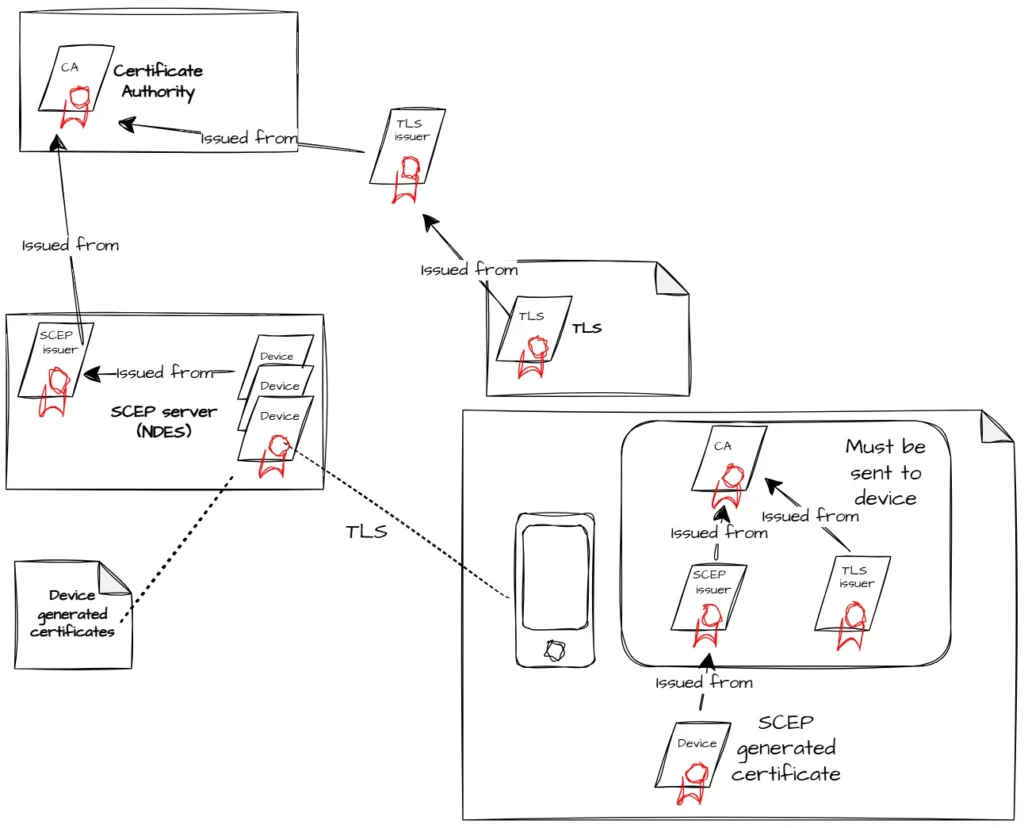
- SCEP Servers and NDES
Microsoft PKI environments often use NDES servers, but other implementations may exist.
- Trust Issues
Since SCEP servers issue certificates from internal PKI infrastructures, devices must trust:
- The CA certificate
- Intermediate certificates
- Issuing certificates
All necessary certificates must be included in the configuration.
- Access to the SCEP Server
SCEP servers are often located inside customer premises.
Common access challenges:
- Non-trusted devices reaching internal URLs
- Limited-access enrollment networks
- SIM/APN-based network paths
- TLS certificates that are not globally trusted
If the SCEP server uses internal TLS certificates, the full trust chain must be added to the configuration.
- Mobile Device Trust Behavior
Mobile devices often do not download certificate chains automatically.
All required trust certificates must be delivered in the profile.
4. Requirements for SCEP Servers
The SCEP server must be configured to use a static secret, because mobile devices do not support advanced negotiation.
5. Wi-Fi Setup Using SCEP
Advanced Wi-Fi (EAP-TLS) setups may use certificates supplied via SCEP.
A certificate can be either:
- Pre-created and distributed, or
- Generated per device using SCEP
Once the Wi-Fi profile includes SSID, WPA settings, EAP-TLS parameters, and trust certificates, the device attempts connection.
- Apple Devices
Apple devices do not automatically renew certificates.
Profiles must be reapplied to trigger renegotiation.
- Android Devices
Android does not natively support SCEP.
Devices must use the CapaOne Agent to handle SCEP negotiation.
Common Problems & Debugging
SCEP environments can be complex due to trust and PKI chaining requirements.
- Trust Chain Requirements
Devices must receive the full certificate chain for:
- The SCEP server (TLS)
- Intermediate CAs
- Root CA
- RADIUS server (TLS)
If the chain is incomplete, the user will be prompted to manually confirm trust before Wi-Fi connects.
- Pre-Verification
Open network standards require pre-verification of certificates.
This must be configured within the Wi-Fi profile by linking certificate payloads to the relevant CA/issuing certificates.
Maintenance & Best Practices
- Always include the full certificate chain in SCEP and Wi-Fi profiles
- Ensure SCEP server uses a static secret
- Validate network access paths early
- Reapply SCEP/Wi-Fi profiles before certificates expire (Apple)
- Install the CapaOne Agent on Android devices that need SCEP
